
As part of your set up process please be sure to scan one of your ID badges on the reader of the clock.
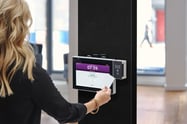
Successful scan - you are all set!
Unsuccessful scan with error User Undefined or Not Accepted...
- Select the "Use ID/PIN" option on the kiosk screen and make sure your curser is in the Kiosk ID/Phone Number field and scan your badge. The number it displays is what is needed to be entered in that user's Frontline Time and Attendance account in the Alt Scanning ID field.
- If the number you see in that field is not the number you would expect your card to be outputting (most often, it is the number printed on your card), please contact Touchpoint Support
Prox Reader does not recognize the scan at all - contact Touchpoint tech support for assistance.
If your district already has a database listing the output of each card, there is an option to import that information directly in to Frontline. Please be sure to first verify that the Touchpoint prox reader displays the same number you have in your database.
No database, no problem! We have a prox intake form that we can set up on the clock to easily create a spreadsheet of the information. Click HERE for a link describing that process.